CA State Auditor Says CA ALPR Use Imperils Privacy

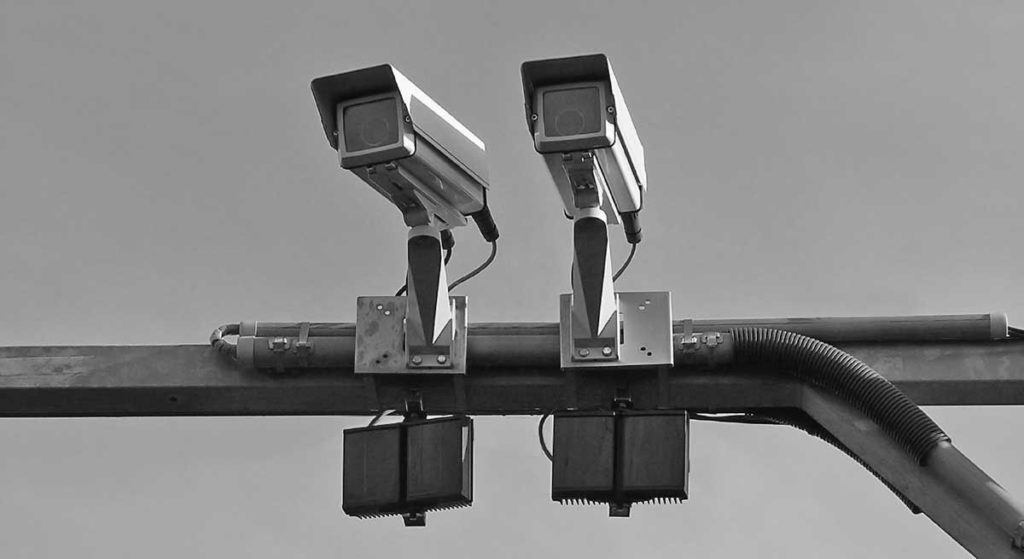
A state audit of license plate reader use by CA law enforcement agencies requested by State Senator Scott Weiner concluded that existing policies were largely not compliant with existing state law and that laws needed to be strengthened.

The CA State Auditor stated “the law enforcement agencies we reviewed must better protect individuals’ privacy through ensuring that their policies reflect state law. In addition, we found that these agencies must improve their ALPR data security, make more informed decisions about sharing their ALPR data, and expand their oversight of ALPR users.”

 The auditor went on to state: “the statewide survey of law enforcement agencies we conducted found that 70 percent operate or plan to operate an ALPR system, and this raises concerns that these agencies may share the deficiencies we identified at the four agencies we reviewed”.

Kick The Tires of the CCPA

In celebration of Data Privacy Day (earlier this week), and the operational start of the California Consumer Privacy Act (CCPA), privacy advocates invited CA legislators to take the law out for a spin.

Our practice companies: Tik-ToK, a youth-oriented social media network, and Experian, one of the 3 leading credit bureaus in the country.

While legislators are trying out their new law, you can also join the impromptu test. See if you can find out what Tik-Tok and Experian have collected about you, and ask them to stop selling it, and tell us how it goes!

Privacy for the Everyday Person (End): Resources

NameDescriptionInformation You Can Find
Surveillance Self DefenseA guide from the Electronic Frontier Foundation that teaches you how to protect your privacy online. It covers tools, strategies, and step-by-step tutorials for defending yourself from government and corporate surveillance.Attending a Protest  

How to: Get to Know iPhone Privacy and Security Settings  

Privacy for Students
Defend Our MovementsA toolkit for activists, organizers, and marginalized communities to strengthen digital security.Using Facebook in an Era of Mass Deportation  

Anti-Doxing Guide for Activists Facing Attacks from the Alt-Right
Tech ActivistA resource hub focused on tech education and privacy rights for Black and brown communities. Offers workshops and training to empower digital freedom and resist surveillance.Ongoing Virtual Classes – Offline and Online Security Tips for Protesters and Organizers    
Electronic Privacy Information Center (EPIC)EPIC is a public interest research center in Washington, DC. EPIC routinely files amicus briefs in federal courts, pursues open government cases, defends consumer privacy, organizes conferences for NGOs, and speaks before Congress and judicial organizations about emerging privacy and civil liberties issues.Guide to Practical Privacy Tools
Civil Liberties Defense CenterProvides legal support and education for activists and movements. Focuses on defending civil rights in court and offering “know your rights” resources.Digital Security Program
Equality LabsEquality Labs is a coalition of artists, advocates, healers, technologists and organizers working on intractable systems of oppression through a collaborative solution-making model for movements.Digital Security
Privacy Rights ClearinghousePrivacy Rights Clearinghouse is a 501(c)(3) non-profit organization committed to advancing data privacy for all by expanding access to information, increasing participation in policy discussions, and advocating for stronger rights.    Law Overview  

Mobile Health and Fitness apps
Wizcase Online Privacy GuideA great introduction to Virtual Private Networks with pictures and practical advice! 
Privacy GuidesPrivacy Guides is a socially motivated website that provides information for protecting your data security and privacy. We are a non-profit project with a mission to inform the public about the value of digital privacy, and about global government initiatives which aim to monitor your online activity. Our website is free of advertisements and not affiliated with any of the listed providers. Privacy Guides is built by volunteers and staff members around the world. All changes to our recommendations and resources are reviewed by at least two trusted individuals, and we work diligently to ensure our content is updated as quickly as possible to adapt to the ever-changing cybersecurity threat landscape.Recommended Privacy Tools
Privacy ToolsThe older website of Privacy Guides, created in 2015 after the Snowden revelations.Guide
Digital Privacy YouTube Videos NBTV is a project of the Ludlow Institute, a research and media institute dedicated to helping you reclaim control of your digital life. Created and hosted by Naomi Brockwell.Find videos HERE!

< Back | Home

—- Published January 2026 —-

Privacy for the Everyday Person (14): CALIFORNIA – Deleting Your Data Online

In California, there is a powerful new law called the Delete Act (and a tool it creates called DROP). If you live in California, this is a game-changer for your privacy.

What is the “Delete Act”?

Right now, there are hundreds of companies called “Data Brokers.” These are companies you’ve likely never heard of, but their entire job is to collect your personal info (like your income, your hobbies, or your political party) and sell it to others.

Even if you are careful with what you post on social media, Data Brokers are still “vacuuming up” info about you from public records and other apps, from what you buy to where you visit to whom you are related to!

Before this law, if you wanted your data deleted, you had to find every single one of those hundreds of companies and ask them one by one, an almost impossible task!

The Delete Act changes that. It creates a “one-stop-shop” where you can tell every registered data broker ALL AT ONCE to delete your information. 

What is “DROP”?

DROP stands for the Delete Request and Opt-out Platform.

Think of it like the “Do Not Call” registry, but for your personal data. Starting in January 2026, you will be able to go to a single website and click one button, which will send a “Delete Me” notice to every Data Broker in California.

Why should you care?

  • Stops the Profiling: A DROP notice stops companies from building a secret file on you to decide what ads you see or whether to approve you for certain services.
  • Ongoing Protection: Once you make the request through DROP, data brokers have to keep deleting your info every 45 days. They can’t just delete it once and then start collecting it again the next week.
  • Stiff Penalties: If a company doesn’t follow your request, the state can fine them $200 per day, per request. This financial punishment makes companies take your privacy very seriously.

What should you do?

Use the DROP Button, starting Jan 2026

The official platform (DROP), built by the California Privacy Protection Agency, is HERE.

You might see companies today offering to “clean up your data” for a monthly fee. While some are helpful, remember that the California DROP platform will be FREE. You won’t have to pay a private company to do what the state is making available for everyone.

ADDITIONAL RESOURCES

HERE is a more in-depth explanation of the DELETE Act and the DROP tool it creates.

HERE is a more in-depth video about Data Brokers.

< Back | Home | Next >

—- Published January 2026 —-
Privacy for the Everyday Person (13): Generative AI (What to Know Before You “ChatGPT”)

You’ve probably heard a lot about AI tools lately, like ChatGPT, Gemini, or Perplexity. Maybe you’ve seen a friend use them or even tried them yourself to do everything from finding the best Chinese restaurant in your neighborhood to figuring out creative ideas for your 10 year old’s birthday!

These AI tools are like super-powered versions of Google that you can have a conversation with, almost like a real person who can answer almost any question you can think of.

However, there is a catch: when you use these AI tools, you aren’t just searching for a quick answer. You are giving information to a digital program that remembers everything you tell it. Because of this, you should be careful about what you share! !

There are three big issues with using these AI tools:

1. The “Memory” Risk

Most AI tools are set to “remember” whatever you tell them. If you tell an AI your private medical symptoms or a secret about your job, that that information is now stored with the company providing the AI Assistant.

2. The “Stranger” Risk

Sometimes, real people (employees at the AI tool company) read through chats to make sure the AI isn’t being rude or broken. You should assume that anything you type could eventually be seen by a human eyes.

3. The “Confused” Risk

AI tools are great, but they aren’t always right. They can “hallucinate,” which is a fancy way of saying they can sound very confident while saying something that is completely untrue. Never use AI tools for important (medical, legal, financial) advice without double-checking whether that information is correct.

Here are general tips to stay safe:

  • Don’t share personal or sensitive data: Don’t share your full name, your kids’ names, your home address, or your specific health/financial information.
  • Keep it General: Instead of saying, “Why does my elbow hurt after hitting it on my door at 123 Main St?” just ask, “Why would an elbow hurt after hitting a door?”
  • Check the Settings: Most of these apps have a “Privacy” or “Data” section in the settings. Look for a switch that says “Don’t use my data for training” and turn it on! (Or, why not, ask the AI Assistant how to do it!)

HERE is a longer video about the privacy of AI tools.

< Back | Home | Next >

—- Published January 2026 —-
Privacy for the Everyday Person (12): Data Breach (Before Your Personal Information Ends Up Stolen)

A “data breach” happens when a company or organization that holds your personal information gets hacked or leaks information by mistake. This can include things like:

  • your name, address, phone number
  • Email and passwords
  • Social Security number
  • Credit card or bank account details
  • Health or insurance records

Once this information is out there, it can be used (sometimes months or even years later) for identity theft or credit fraud.

What to Do If You Hear About a Data Breach

You might get an email or news alert saying your data was part of a breach. Even if it’s just your email and password, it’s smart to take the alert seriously. Two of the most important steps are:

(1) Freeze Your Credit

Freezing your credit means no one can open new accounts in your name (not even you) until you unfreeze it. It’s free to do, and you can turn it on and off anytime.

Freezing your credit does NOT affect your current credit cards or loans. It protects you from someone taking out a credit card, loan, or apartment lease using your identity.

You need to freeze your credit with each of the three major credit bureaus: Equifax, Experian, TransUnion.

This is one of the strongest steps you can take to stop identity theft before it happens.

(2) Obtain Your Free Weekly Credit Report from These Three Credit Bureaus

AnnualCreditReport.com is the official site established by the 3 major credit bureaus (Equifax, Experian, TransUnion) to comply with the federal law requiting them to offer at least 1 free credit report annually. These 3 credit bureaus now voluntarily offer weekly credit reports. You just have to register!

Do I Also Need to Pay a Company to Monitor If My Personal Information is Online?

Probably not. Most people can stay safe without paying for an identity or credit monitoring service, as long as they take a few basic steps to secure their digital security and privacy, including:

  • freezing their credit
  • checking their credit reports from AnnualCreditReport.com
  • setting up alerts on their bank and credit cards to receive texts when there is suspicious activity
  • using strong passwords and Two-Factor Authorization (2FA), especially for email, bank, or shopping accounts. Click HERE to read more about 2FA

< Back | Home | Next >

—- Published January 2026 —-